Showing posts with label Rules to Jailbreak iPhone 3G. Show all posts

PwnageTool 3.0 For Mac Is Here To Unlock & Jaibreak iPhone 3.0 Firmware

The Dev Team just released a new version of PwnageTool that will jailbreak the iPhone 1st gen., iPhone 3G, and the iPod Touch 1s gen. The new iPhone 3G S is not supported yet.

According to the Dev Team:

This is the low down on our tools for use with the 3.0 firmware from Apple, read the whole post in full before attempting anything. Because of some bugs and unexpected changes this will be a multipart release, starting with the release of PwnageTool for Mac OS X. QuickPwn for Mac OS X and Windows will follow sometime soon, please don’t bug us about it, we are working flat out to get everything finished to release them.

  1. GOLDEN RULE: If you are using a 3G iPhone with yellowsn0w and rely on yellowsn0w to obtain cellular service, then you should NOT use PwnageTool right now. UltraSn0w is not included with this release and therefore your baseband will be locked and unable to use an operator other than the official one it was bought for. UltraSn0w will be release via APT (cydia and icy) soon. If you have an original iPhone (1st generation) then 3.0 unlock works with this PwnageTool release.
  2. Yellowsn0w in its current form will NOT work with the baseband version that is present in the 3.0 update, you will need Ultrasn0w, which will be released sometime soon, Ultrasn0w will work with all iPhone 3G models (but not 3GS), even ones that were previously unlockable, Ultrasn0w (when available) will be released via APT (this means you can get it via Cydia or Icy).
  3. Please read all parts of this post before downloading and using these tools.
  4. Read items 1, 2 and 3 again and again.
  5. At the bottom of this post are the bittorrent files for the 3.0 capable version of PwnageTool.
  6. This app is suitable for the recent 3.0 release.
  7. PwnageTool will NOT work for the iPhone 3GS.
  8. PwnageTool WILL work for Original iPhone (1st Generation), Original iPod touch (1st Generation) and the iPhone 3G.
This will just unlock the 1st gen iPhone. It will not unlock your iPhone 3G or iPhone 3G S. The Dev Team will release Ultrasn0w soon and this is the tool you will need to unlock your iPhone 3G. iPhone 3G S owners will have to wait for the Dev Team to come up with a jailbreak first.

Official Bittorrent Releases -

Unofficial Mirrors

UPDATED: Ultrasn0w is available now via Cydia!. Check out my post here on how to unlock iPhone 3G using Ultrasn0w.
You have read this article Apple iPhone News / iPhone 3G baseband / iPhone 3G S / iPhone Dev-Team / iPhone News / iPhone OS 3.0 / iPhone Tips / iPhone/IPod Touch / jailbreak iPhone 2G / Jailbreak iPhone 3G / Rules to Jailbreak iPhone 3G with the title Rules to Jailbreak iPhone 3G. You can bookmark this page URL http://fivesatellites.blogspot.com/2009/06/pwnagetool-30-for-mac-is-here-to-unlock.html. Thanks!

Guide To Unlock iPhone 3G (2.2.1 Firmware) Using Yellowsn0w

This is a good news for iPhone 3G users who do not intentionally upgrade to this version of firmware (Quick tip: It’s always good for you to turn off auto-upgrade in iTunes) and are searching for ways to unlock iPhone. Here I try to show you a solution for that. But, before read on, please note that this solution does not fit for all iPhone 3G. It's specially for unjailbroken iPhone 3G and 2.2.1 firmware users only.

Let me remind you here, "unlock" word is refer to the process to open up your iPhone to accept all carriers. Unlocked iPhone allows you to use SIM card from all carriers. You are no longer bind to the official carrier (e.g. AT&T) approved by Apple. And for, "jailbreak" your iPhone means you are allowed to install 3rd party applications on iPhone. Its mean to say that, this guide only instruct to you about unlocking iPhone 3G 2.2.1 firmware.

Baseband Problem..

Presently, there is no easy way or software to unlock this version of firmware. To be exact, there is no unlock solution to tackle the baseband v2.30.03, which is upgraded together with firmware 2.2.1. The latest version of yellowsn0w, the iPhone 3G unlock solution, doesn’t support iPhone with baseband 2.30.03 or up.

The Solution..

Thanks to the jailbreak community. iPhone developers have created a simple tool called “3G Fuzzyband Downgrader” to downgrade the baseband from 2.30.03 to 2.28.00. By downgrading the baseband, you can then use Yellowsn0w to unlock the iPhone. However, there is a catch. The downgrade utility only supports iPhone with bootloader v5.8. Don’t worry if you do not know your bootloader version. The downgrader will handle the checking for you. But if you’re not using this bootloader version, I’m sorry that there is currently no software solution to unlock your iPhone 3G. You can either wait for iPhone Dev team to develop the solution or you can opt for SIM-card based unlock.

Step 1: Follow this step-by-step guide to jailbreak your iPhone 3G with firmware 2.2.1. Before your start to jailbreak backup you iPhone data synchronizing it with iTunes. You may see an instruction on how to backup your iPhone.

Step 2: After jailbreak, go to Cydia and download “3G Fuzzyband Downgrader”. You may read an instruction on how to downgrade iPhone 3G baseband using 3G Fuzzyband Downgrader.

Step 3: With the baseband downgrade completes successfully, you can use Yellowsn0w to unlock your iPhone 3G. The yellowsn0w can be downloaded freely via Cydia. For details, you can refer to my post on "Guide to unlock iPhone 3G (2.2) using Yellowsn0w". Bear in mind before your start to unlock using Yellowsn0w, please skip Step 1 and Step 2 , you should start to unlock at the step 3.

I hope this guide can benefit those who got the iPhone locked after firmware 2.2.1 upgrade. But let me emphasize again. The above instructions can only work for iPhone 3G with bootloader 5.8. Good luck!


You have read this article Guide to Jailbreak iPhone 3G / How to Unlock iPhone 3G / iPhone 3G baseband / iPhone Tips / iPhone/IPod Touch / Jailbreak iPhone / Rules to Jailbreak iPhone 3G with the title Rules to Jailbreak iPhone 3G. You can bookmark this page URL http://fivesatellites.blogspot.com/2009/05/guide-to-unlock-iphone-3g-221-firmware.html. Thanks!

Guide To Jailbreak iPhone 3G (2.2.1 Firmware) Using QuickPwn 2.2.5-2 (Windows)

The instructions below is quite similar with unlocking & jailbreaking iPhone 2.2.1 firmware update (iPhone 2G), the different things here, you don't need to unlock your iPhone 3G. But for iPhone 2G, unlocking and jailbreaking is very recommended instead. See the details on how to unlock & jailbreak iPhone 2G for 2.2.1 firmware.

Before you run into the details of jailbreak, i would like to mention about "unlock" and "jailbreak" words here. You’re probably aware that the word “Unlock” is missing in the post title. It's meaning to say that, there is no solution to unlock iPhone 3G for 2.2.1 firmware so far. This statement valid by the time you read this post. That means you are still bind to single carrier and can’t use SIM card from other carriers.

Let me remind you here, "unlock" word is refer to the process to open up your iPhone to accept all carriers. Unlocked iPhone allows you to use SIM card from all carriers. You are no longer bind to the official carrier (e.g. AT&T) approved by Apple. And for, "jailbreak" your iPhone means you are allowed to install 3rd party applications on iPhone. This applies to all version of firmwares. Anyways, this post is devoted for iPhone 3G users who want to jailbreak their iPhones.

Note: This guide is now updated with procedures for iPhone 3G 2.2.1 firmware. But you should read this warning carefully. Presently, you cannot unlock iPhone 3G 2.2.1 firmware using Yellowsn0w. Please use firmware 2.2 if you're planning to unlock. Check out my post on how to unlock iPhone 3G 2.2 firmware using Yellowsn0w.

UPDATED: A good news for iPhone 3G 2.2.1 user, for those who accidentally upgrade to 2.2.1 firmware and intended to upgrade with this latest firmware, now you can unlock iPhone 3G 2.2.1 firmware using YellowSn0w. Check out my post on how to unlock iPhone 3G 2.2.1 firmware using YellowSn0w. Please bear in mind, its only for iPhone 3G 2.2.1 firmware and unjailbroken iPhone 3G. Please ignore the statement above if you understand this matter.

Important: please hold and read through statement below. Before your proceed with jailbreaking you should read quoted from iPhone Dev-Team below.

This is the low down on our tools for use with the 2.2.1 firmare from Apple, read the whole post in full before attempting anything. Please note that the Windows version of QuickPwn has been updated to version 2.2.5-2

  1. GOLDEN RULE: If you have a 3G iPhone running 2.2 firmware and you want to keep your ability to use yellowns0w (or the option to use it in the future) do NOT use QuickPwn, and do not use the official ipsw or the iTunes update process without using PwnageTool.
  2. Yellowsn0w will NOT work with the baseband version (02.30.03) that is present in the recent 2.2.1 update. If you want to use Yellownsn0w you will need to create and restore using a custom .ipsw that will allow you to update safely to 2.2.1 without applying the 02.30.03 baseband update. You’ll then have a 3G iPhone running 2.2.1 with an older baseband version that is still vulnerable to yellowsn0w, following these steps ensures that yellowsn0w will still operate.
  3. Please read all parts of this post before downloading and using these tools.
  4. Read items 1, 2 and 3 again and again.
  5. At the bottom of this post are the bittorrent files for the latest versions of PwnageTool and QuickPwn.
  6. These apps are suitable for the recent 2.2.1 release.
  7. The Yellowsn0w version has been updated to 0.9.7. Yellowsn0w is available from Cydia or Installer - this version allows compatibility with pwned 2.2.1 system (not baseband). Again„ remember 0.9.7 yellowsn0w DOES NOT WORK WITH 2.2.1 (02.30.03) directly - you need to be running a ‘pwned’ version of 2.2.1 which didn’t upgrade the baseband during the restore/upgrade.
  8. Users of OS X 10.5.6 will be unable to use DFU mode correctly, please see the note towards the end of this post to easily fix this issue.

Note: If you bought iPhone with the new one, you should notice your iPhone has embedded with iPhone 2.2.1 firmware update. You should ignore Step 3 - Step 6. You might be begin jailbreak your iPhone with the Step 7 until complete...For the Step 3 - Step 6, its devoted for those who would like to upgrade their iPhone 3G with firmware 2.0 to 2.2, 2.1 to 2.2 or 2.2 to 2.2.1.

Step 1: Make sure you have upgraded to iTunes 8.0.2 and backup your iPhone data by synchronizing it with iTunes 8.0.2. See instruction here on how to backup your iPhone.

Step 2: Download QuickPwn 2.2.5-2 and iPhone 2.2.1 firmware (3G). Save them all in the same folder. Unzip QuickPwn22.zip and make sure you have all the files in place before continue.

Step 3: This following step will be guide you how to Install your iPhone firmware 2.2.1 via iTunes 8.0.2. Just connect your iPhone to your computer via USB cable and launch iTunes. Select your iPhone in iTunes. You might see all information about you iPhone and the button “Upgrade” and “Restore” appear in iTunes window.
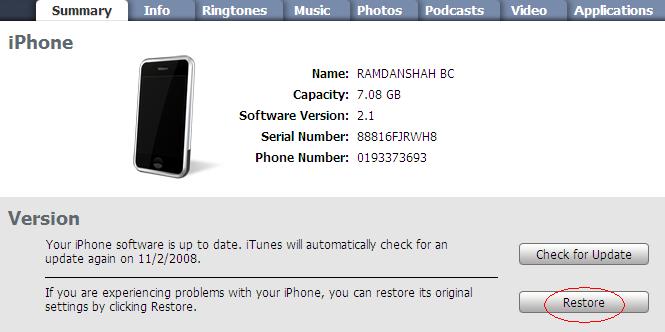
Step 4: Hold the “SHIFT” key and click the “Restore” button simultaneously. The iTunes file dialog will pop up for you to select the firmware file. Locate the “iPhone1,2_2.2.1_5H11_Restore.ipsw” that you have downloaded in previous step and click “Open”.

Step 5: iTunes will then restore your iPhone with firmware 2.2.1 automatically. Keep your iPhone connected, don’t touch anything and wait until the process complete.

Jailbreak with QuickPwn 2.2.5-2


Step 6: Your iPhone should completely restore to firmware 2.2.1. But it’s still "Unjailbreak" right now

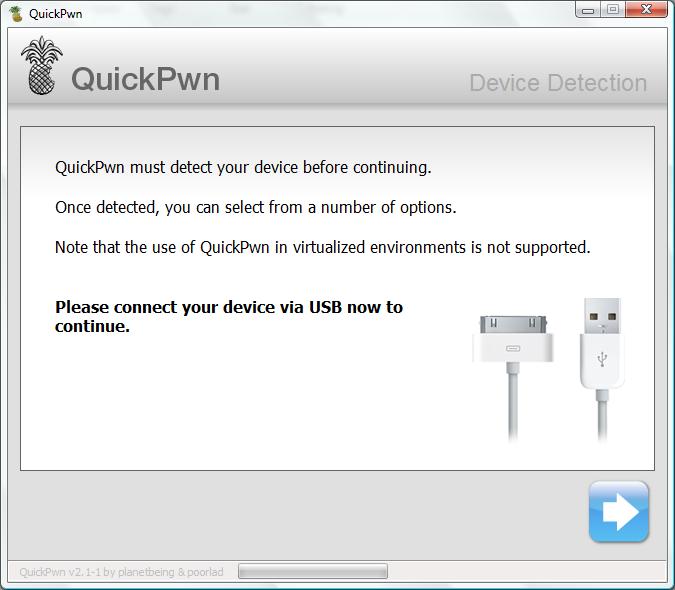
Step 7: Launch QuickPwn 2.2.5-2 to start jailbreak. Make sure your iPhone connect via USB cable and then click blue button to proceed.

QuickPwn 2.2.5-2

Step 8: You are required to provide the firmware 2.2.1 IPSW file. Click “Browse” button to locate the “iPhone1,2_2.2.1_5H11_Restore.ipsw” were you had downloaded in Step 2. Once complete, QuickPwn will verify with the mark symbol. Then click blue arrow button to proceed.


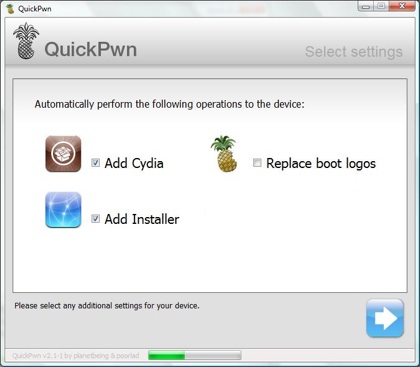
Step 9: You are required to configure the settings for QuickPwn. Normally, you could mark all checkboxes (i.e. Add Cydia, add installer, Replace boot logo). If you would like to keep the Apple logo already in your iPhone, left “Replace boot logo” unmarked. Click blue arrow button to proceed.

Step 10: Make sure your iPhone should still be connected with USB cable. QuickPwn requests you to confirm it once again before unlock & jailbreak process will begin. If you’re ready, click blue arrow button to proceed.


Step 11:
QuickPwn automatically puts the iPhone into recovery mode. After that, you’ll be instructed to hold Home button for 5 seconds. Then hold Home and Power buttons together for 10 seconds. Next, release Power button and continue to hold Home button until your iPhone is in DFU mode (QuickPwn will inform you automatically when you’re in DFU mode).

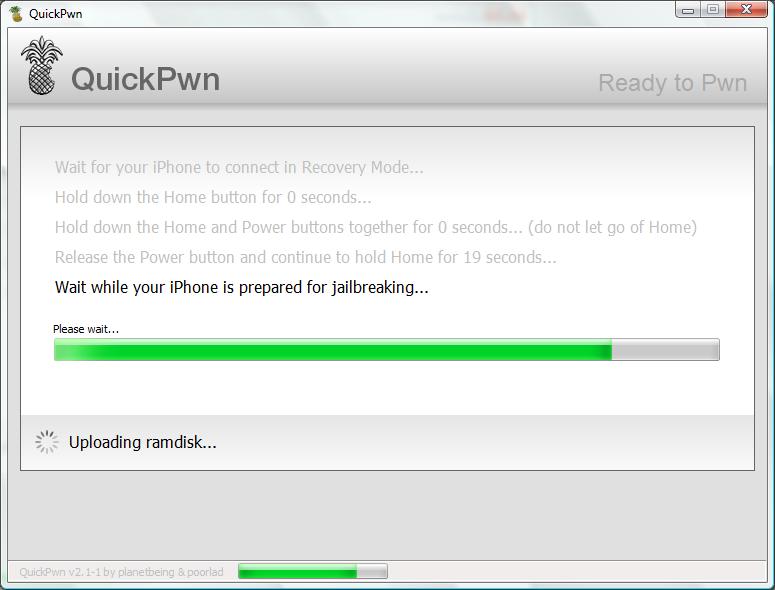


Step 12: During unlocking & jailbreaking process, your iPhone screen shows downloading jailbreak data and flashing NOR progress. What you have to do just keep waiting and don’t touch anything to your iPhone.


Step 13: QuickPwn will let you know the jailbreak process is successful. Your iPhone will be restarted automatically.


Step 14: Now jailbreaking process has complete with iPhone firmware 2.2.1. Finally, sync back your iPhone to restore your backups data with iTunes 8.0.2.

Step 15: For beginner user, you might be want to know what to do after Jailbreak. Check out my post here on how to use Cydia. For those who already knew about the Cydia you could ignore this step.

Note: If you have problem and troubleshooting during jailbreak using QuickPwn. You may see the details here about fixes and solution.


You have read this article Guide to Jailbreak iPhone 3G / How to jailbreak iPhone 3G / iPhone 3G baseband / iPhone/IPod Touch / Jailbreak iPhone 3G / Rules to Jailbreak iPhone 3G with the title Rules to Jailbreak iPhone 3G. You can bookmark this page URL http://fivesatellites.blogspot.com/2009/03/guide-to-jailbreak-iphone-3g-221.html. Thanks!

Jailbreak iPhone 3G For 2.2 firmware: You Should Read This!


I suggest you read through the following carefully before jailbreaking iPhone 3G on Windows for 2.2 firmware. By the time I wrote this post, QuickPwn is the only tool available on Windows to jailbreak iPhone 3G. But you must aware several notice as follow before you consider to use it to jailbreak.

The current version of QuickPwn and PwnageTool can jailbreak iPhone 3G but the jailbreak may potentially impact any future unlock of iPhone 3G. May be you should take look quote from my previous post about jailbreaking iPhone 3G.

The new version of QuickPwn or PwnageTool will NOT unlock your iPhone 3G. iPhone Dev Team is still in process to develop a solution for unlock. And, if you’re using a locked version iPhone 3G and want to unlock in future, please do NOT use QuickPwn and do not use the official IPSW or iTunes update process.

In other words, if you’re using iPhone 3G, the only way to have a Safe Jailbreak is to use PwnageTool (Mac only). By using QuickPwn to jailbreak iPhone 3G, you’ll not be able to unlock your iPhone 3G in future, even iPhone Dev Team develops the solution.

Here are the rules:

  • For those who are using an iPhone 3G which is locked to a particular carrier and you want to have it unlock in future. Please DO NOT USE QuickPwn to jailbreak. If you really have certain need to jailbreak, please use PwnageTool to jailbreak.
  • For those who have an unlocked iPhone 3G. You iPhone 3G is already unlocked, you are free to use QuickPwn to jailbreak your iPhone.
  • You own a locked version of iPhone 3G but you’re care about the unlock in future. You can go ahead and proceed to jailbreak.
  • And, for those who are using some SIM-card based solutions to unlock iPhone 3G (e.g. TurboSIM), please hold off the jailbreak. There are issues reported by other readers that the iPhone is locked again after upgrade.


You have read this article iPhone/IPod Touch / Jailbreak iPhone 3G / PwnageTool 2.2 / QuickPwn 2.2 / Rules to Jailbreak iPhone 3G with the title Rules to Jailbreak iPhone 3G. You can bookmark this page URL http://fivesatellites.blogspot.com/2008/12/jailbreak-iphone-3g-for-22-firmware-you.html. Thanks!