Showing posts with label Winterboard Theme. Show all posts

Acier Theme (WinterBoard Theme)

Another awesome iPhone themes called Acier, developed by Monty, that you should never miss. It’s a spaceship-like, futuristic theme, loaded with UI and custom icons. It’ll take you some efforts to setup the theme but it just looks so cool and completely makes your iPhone stand out of the other regular iPhones. But it’ll take you some time to configure and install the themes.


NOTE: make sure you have a jailbroken iPhone and install the following applications using Cydia:
  • Winterboard – The heart of iPhone theme that lets you completely customize the look & feel of iPhone screen
  • Five icon dock – Allows you to put extra icon in the dock
  • Five column springboard – Adds extra column for iPhone home screen
  • iC Theme Essentials – Bundles essential theme applications such as iBlank, Categories
  • WeatherIcon – Displays the current weather inside iPhone icon
  • LiveClock – Provides a live clock in the iPhone icon
  • SpringJumps – Offers special icons as shortcuts to jump to different pages of Springboard directly
  • Categories - organize your icon on SpringBoard into a folder.
  • iBlank - Lets you create blank icons.

Install Acier Theme Via Cydia

1. Launch Cydia > Select “sections” at haptic menu > Select “Themes (SpringBoard)” category > and Select “Acier” or you can tap “Search” in Cydia and type “Acier” > Select “install” button at the right top and confirm it to install.

2. (Optional) If you are already using Winterboard with other themes, please unmarked it in Winterboard. This will make the following configuration process much easier.

3. Launch “Categories” and create two folders: Apps and Games. Place all your games and applications into these two folders except leaving the following application behind:


  • Phone
  • Settings
  • Contacts
  • Weather
  • iPod
  • App store
  • Cydia
  • Clock
  • Safari
  • Games
  • Apps
  • iTunes
  • Photos
  • Calendar
  • Text/messages
  • Mail
  • Maps
  • Winterboard
  • YouTube
4. Tap “iBlank” to launch it. iBlank is an application to let you create blank icons. Use it to create 52 blank icons. You can tap “13″ for four times to create a total of 52 icons.


5. Go back to home screen and launch SpringJump. Tap “General” and disable “Page Titles”. Go back and tap “Jump Icons”. Flip the switch to OFF for Page 5 – 8.


6. Place the remaining five SpringJump icons in the dock.

7. This is the most important part. Just arrange the icons like the screenshots shown below.


8. Once you complete the icon arrangement, launch “Winterboard” and enable “Acier”, as well as other options shown below:

9. Click home button to refresh the springboard and enjoy!
You have read this article Cydia Apps / Free Cydia Apps / How to install themes on iPhone / iPhone Theme (WinterBoard) / iPhone Tips / iPhone Tips and Tricks / iPhone/IPod Touch / Jailbreak iPhone / Winterboard Theme with the title Winterboard Theme. You can bookmark this page URL https://fivesatellites.blogspot.com/2009/12/acier-theme-winterboard-theme.html. Thanks!

Buuf 2 Theme (WinterBoard Theme)

Buuf2 theme is Winterboard theme offered by modmyi.com that inspires by mattahan’s artwork. The theme comes with vivid cartoon icons, sms bubbles, customized weather & note theme and over 500 icons, as well as, a themed dialler.


Install Buuf2 Theme Via Cydia

Launch Cydia > Select “sections” at haptic menu > Select “Themes (SpringBoard)” category > and Select “Buuf2” or you can tap “Search” in Cydia and type “Buuf2” > Select “install” button at the right top and confirm it to install.


Activate Buuf2 Theme Via WinterBoard


Your Buuf2 Theme is still in the “unactive” condition. That's why your still can't see any changes to your theme on SpringBoard. To activate it, just launch Winterboard. Select “Buuf2 Theme”. Your WinterBoard will verify with mark symbol. Press "Home" button and you’ll then bring back to the locked screen. Unlock it and you’ll see a fresh new look of your iPhone. Enjoy!


You have read this article Cydia Apps / Free Cydia Apps / iPhone Theme (WinterBoard) / iPhone Tips / iPhone Tips and Tricks / iPhone/IPod Touch / Winterboard Theme with the title Winterboard Theme. You can bookmark this page URL https://fivesatellites.blogspot.com/2009/12/buuf-2-theme-winterboard-theme.html. Thanks!

Amphibious (WinterBoard Theme)

Amphibious is an extremely unique theme. Normally, I’m not big into “themed” themes, but this one is very well designed. The theme contains quite a few mods including a Weather app mod, iPod app mod, lockscreen mod, lockscreen battery mod, badges, page dots, statusbar, dock, wallpaper and 50 icons. The app also includes 7 alternate wallpapers, an alternate dock, an alternate statubar bar and quite a few alternate icons (these alternate mods would all have to be viewed/changed via ssh).


The developer of the theme does give you a few options in WinterBoard including the ability to turn on/off the Weather app mod, the iPod app mod, the lockscreen battery mod, the Digital LiveClock mod, the Lockscreen mod and the option to choose a 4 icon or 5 icon dock wallpaper. This makes the theme easily customizable.

How To Install Amphibious Amphibious Amphibious Via Cydia

1. Your device must be jailbroken. See tutorial on how to jailbreak iPhone (iPhone 2G / iPhone 3G / iPhone 3GS)
2. Make sure you have WinterBoard installed via Cydia. See tutorial on how to Install WinterBoard.
3. Make sure you have the ModMyi sources installed in Cydia. See tutorial on how to install sources via Cydia.
4.Search for Amphibious in Cydia, run the install.


Launch Cydia > Select “sections” at haptic menu > Select “Themes (Keyboard)” category > and Select “Amphibious” or you can tap “Search” in Cydia and type “Amphibious” > Select “install” button at the right top and confirm it to install.


Activate Amphibious Theme via WinterBoard

Your keyboard theme still in the “unactive” condition. To activate it, just launch Winterboard and select “Amphibious”. Your WinterBoard will verify with mark symbol. Press "Home" button and you’ll then bring back to the locked screen. Unlock it and you’ll see a fresh new look of your keyboard.

Show all
You have read this article Cydia Apps / Free Cydia Apps / Install themes using Winterboard on iPhone / iPhone Theme (WinterBoard) / iPhone/IPod Touch / WinterBoard for Jailbreak iPhone / Winterboard Theme with the title Winterboard Theme. You can bookmark this page URL https://fivesatellites.blogspot.com/2009/10/amphibious-winterboard-theme.html. Thanks!

10 Beautiful iPhone Themes (WinterBoard)

One of the main reasons to jailbreak your iPhone is that it allows you to add custom themes and make it stand out from the crowd of blend and boring iPhones out there. Your iPhone must already jailbroken (iPhone 2G / iPhone 3G / iPhone3GS) in order to use WinterBoard. Winterboard on iPhone (like its predecessor Summerboard for iPhone 1.1.4) is an iPhone theme manager that allows you to change any WinterBoard/SummerBoard theme on iPhone. See instruction here on how to install Winterboard.

Here's my 10 beatiful Theme:

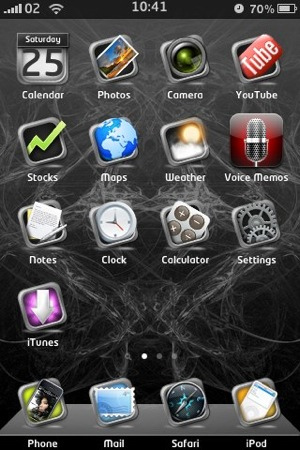
Frame Black Theme
Definitely a unique theme. Each icon is framed into a really nice dark aluminum frame and placed on a beautiful wallpaper.


Monokuro Boo Theme
A Monokuro Boo theme with many icons. I think this theme is kinda cute and funny.


Andrew's Awesome Theme
This is the first theme by young iPhone addict Andrew. This theme makes me smile every time I see it


Niffob Nokta
This custom iPhone theme with knitted icons is very original. Unfortunately, it doesn’t come with many icons.


Dark BlackBerry Theme
A theme with Blackberry-like transparent, glowing icons and a nice dark background.


Etched Base Theme
This theme has a transparent base with a bevel feel to it. It includes almost 200 icons, 18 different wallpapers and more.


Maniac Theme
An original iPhone theme with very large icons. That’s my favorite theme these days and it’s currently installed on my iPhone. It comes with quite a few icons.


AF future Theme
A simple futuristic theme with neon lights icons.


Brown Bag Theme
A rough-looking theme based on a brown paper bag. I think it’s not that beautiful, but it’s a very original theme.

A Rusty iPhone Theme
Want a little rust in your iLife? Get it with this beautiful theme that will probably make your friends go “wow”. This theme is available in the Cydia Store for $1.49.


Activate "Your iPhone Theme" Via WinterBoard


Your iPhone Theme is still in the “unactive” condition. That's why your still can't see any changes to your theme on SpringBoard. To activate it, just launch Winterboard. Select “Downloaded Theme (example: Monokuro Boo)”. Your WinterBoard will verify with mark symbol. Press "Home" button and you’ll then bring back to the locked screen. Unlock it and you’ll see a fresh new look of your iPhone. Enjoy!
You have read this article Cydia Apps / Free Cydia Apps / How to install themes on iPhone / Install Winterboard on iPhone / iPhone OS 3.0 / iPhone Tips / iPhone Tips and Tricks / iPhone/IPod Touch / Winterboard Theme with the title Winterboard Theme. You can bookmark this page URL https://fivesatellites.blogspot.com/2009/09/10-beautiful-iphone-themes-winterboard.html. Thanks!

WinterBoard Settings

WinterBoard Settings will add an option for WinterBoard in your stock iPhone Settings application. When selected, you have the option to turn on/off SpringBoard Only (which will apply WinterBoard themes to only your SpringBoard) and Debug (I’m not exactly sure what this setting would do). You can also view all your WinterBoard themes from the Settings option.

You have to "Add Sources" to you sources in Cydia repository for iPhone first in order to install WinterBoard Settings. At "Add" sections you have to enter this address, http://david.ashman.com/apt..If you not clear about this you can check out my post on how to add sources via Cydia.


Install WinterBoard Settings Via Cydia


Launch Cydia > Select “Sections” at haptic menu > Select “System” category > and Select “WinterBoard Settings” or you can tap “Search” in Cydia and type “WinterBoard Settings” > Select “install” button at the right top and confirm it to install.

Ultimately, you would no longer need to use the WinterBoard application itself, you could do everything through the WinterBoard Settings. When testings WinterBoard Settings, I found that the two applications (WinterBoard itself and WinterBoard Settings) override each other. For example, if you set a theme using the WinterBoard Settings and then you go in a choose a theme from WinterBoard itself…it will override the theme you chose using the WinterBoard Settings and vice versa.


I also found that the SpringBoard Only option seemed to work. It leaves anything that shows up on the SpringBoard (Wallpaper, Dock, StatusBar, Wifi icon…etc) activated but turns off the theme’s mods like calculator, dialer, sms…etc. It also leave the theme’s lock screen mods activated as well. Also you may read how to install WinterBoard Via Cydia.


You have read this article Cydia Apps / Free Cydia Apps / Install Winterboard / iPhone Tips / iPhone/IPod Touch / Jailbreak iPhone / Winterboard for iPhone / WinterBoard for Jailbreak iPhone / Winterboard Theme with the title Winterboard Theme. You can bookmark this page URL https://fivesatellites.blogspot.com/2009/05/winterboard-settings.html. Thanks!

MacBook Air Keyboard Theme For WinterBoard

The MacBook Air Keyboard mod will change your stock keyboard to a black and silver keyboard that resembles a MacBook Air keyboard. I was able to install and uninstall this keyboard with no issues.

Note: If you have a custom keyboard already installed, make sure you uninstall it before installing the MacBook Air Keyboard.

Your iPhone should be unlocked/jailbroken in order to use WinterBoard. Winterboard on iPhone (like its predecessor Summerboard for iPhone 1.1.4) is an iPhone theme manager that allows you to change any WinterBoard/SummerBoard theme on iPhone. See instruction on how to install WinterBoard via Cydia.


Install MacBook Air Keyboard Via Cydia

Launch Cydia > Select “sections” at haptic menu > Select “Themes (Keyboard)” category > and Select “MacBook Air Keyboard” or you can tap “Search” in Cydia and type “MacBook Air Keyboard” > Select “install” button at the right top and confirm it to install.


Activate MacBook Air Keyboard Theme via WinterBoard

Your keyboard theme still in the “unactive” condition. To activate it, just launch Winterboard and select “MacBook Air Keyboard”. Your WinterBoard will verify with mark symbol. Press "Home" button and you’ll then bring back to the locked screen. Unlock it and you’ll see a fresh new look of your keyboard.


You have read this article Cydia Apps / Free Cydia Apps / How to install themes on iPhone / iPhone Theme (WinterBoard) / iPhone/IPod Touch / Jailbreak iPhone Apps / Winterboard Theme with the title Winterboard Theme. You can bookmark this page URL https://fivesatellites.blogspot.com/2009/04/macbook-air-keyboard-theme-for.html. Thanks!